
Separate the pipeline into stages
Five steps sit between a spoken voice and a finished file: recording, audio-track selection, silence filtering, speech recognition and formatting. A blank output does not immediately mean the model fails on your language.
Start by listening to the exact file you handed the recogniser, not a messenger copy or a different video stream. Half of “broken recognition” mysteries end in ten seconds when you discover a muted track or an empty clip.
Once you have text, separate word errors from presentation errors. A missing comma, a dropped negation and a swapped speaker need different fixes. See how speech recognition works for a full breakdown of those stages.
Quick diagnostic table
| Symptom | First thing to check | Next step |
|---|---|---|
| Blank transcript | Is audible speech actually present in that file? | Check audio track, mic input and VAD threshold |
| Wrong language | Is language set to Auto or Translate mode on? | Pick the spoken language explicitly |
| Repeatedly wrong surname | Audibility and exact spelling | Add to vocabulary / replacement list or prompt |
| Looped or invented phrases | Long silence, music or chunk boundary | Enable silence filtering (VAD) or try another model |
| Right words, wrong speaker | Speaker labelling stage | Inspect diarization separately |
Log concrete timestamps such as “quiet voice dropped at 12:34” instead of “bad accuracy”. Specific observations shrink debugging time immediately.
Change one setting on the same test clip
Save a one-minute clip containing the failure and write down your baseline model, language and mode. Then change strictly one parameter at a time.
Swapping models, applying noise reduction and slicing the audio all at once hides which tweak fixed the problem and which introduced new glitches. Once a setting works on your test clip, verify two more tricky passages elsewhere in the file.
Not all mistakes cost the same
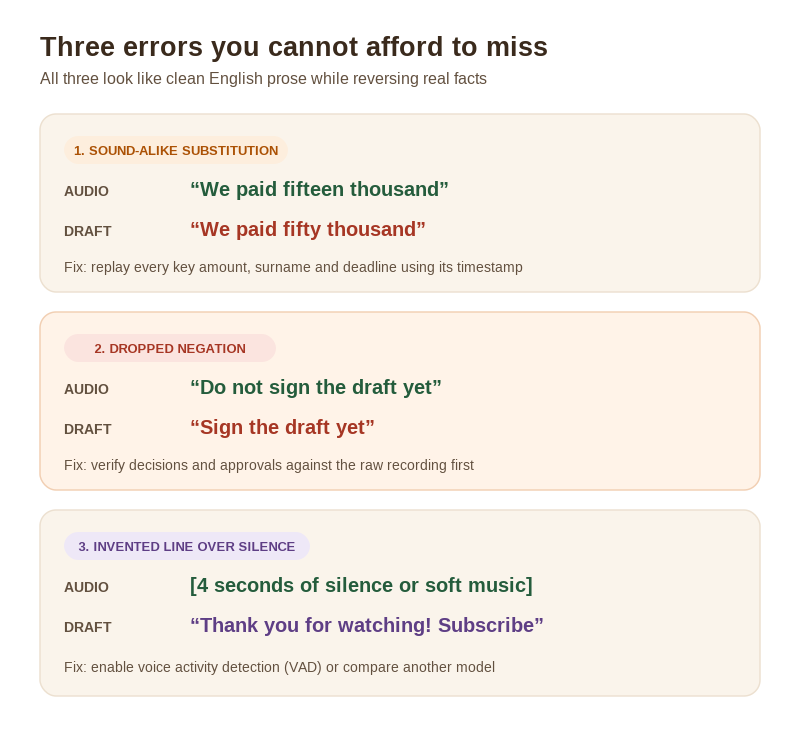
Smooth grammar lowers your guard. Look at these two lines: both read naturally, yet one reverses the decision completely.
Compare the audio against the draft
“We will not send the draft.”
“We will send the draft.”
The negation vanished. Restore “not” from the audio before polishing punctuation.
Prioritise review by consequence: decisions, deadlines, prices and negations come before commas and style.
Names, jargon and numbers
Models favour common words over unfamiliar surnames that sound close. Replacement vocabularies and initial prompts help noticeably, yet never guarantee perfection—verify unusual names against the recording or attendee list.
Double-check magnitudes alongside digits: “fifteen” turns easily into “fifty”, and “million” into “billion”. Never fix a number just because one value feels logical; replay that timestamp and confirm.
Repetition and phantom words over silence
Sometimes a model inserts entire sentences nobody spoke. This quirk is documented in the Whisper large-v3 model card. Do not assume someone whispered off-mic—play the pause first.
Long silence, background music or awkward chunk splits are the usual culprits. Turn on silence filtering (VAD) or compare a different local model on the same excerpt.
When you cannot confirm a phrase even on headphones, mark
[unclear 14:22]. Honest uncertainty with a timestamp beats a confident guess every time.
Measure what “better” means for your job
Track high-impact failures rather than raw typo counts: missing turns, mangled names, wrong figures and lost negations. That short tally shows immediately whether you should switch speech models, expand your replacement dictionary or improve how you record the next interview.
Sources and further reading
- Whisper large-v3 limitations.
- Choosing a Whisper model: testing compatibility on your own clip.
- Transcription: moving from draft to verified document.