
Three separate questions about one recording
It is easy to blur three distinct tasks when reviewing a meeting:
- Speech recognition answers “which words were spoken?”
- Diarization answers “when is each voice speaking?”
- Speaker identification answers “what is this person’s real name?”
One app may run these stages together, yet clean words never guarantee clean attribution. “Speaker 1” is simply a temporary cluster label for one file.
For an example of a dedicated pipeline, see pyannote Community-1, which outputs timed speaker segments.
Reading a conversation timeline
Below is a brief illustrative sequence showing how labels connect separate turns by the same voice.
On the next file—or even a different run—those numbers can swap. Never treat “Voice 1” as a permanent ID across separate meetings.
Why two interviews cannot be merged by label number
The same host easily receives different numbers in two recordings. Build a quick label map for each file before combining transcripts.
Same participants, swapped label numbers
- Voice 1
- Host
- Voice 2
- Guest
- Voice 1
- Guest
- Voice 2
- Host
Listen to two or three characteristic lines in each file and replace numbers with names or roles first. Merging every “Voice 1” up front can hand the guest’s quotes to the host.
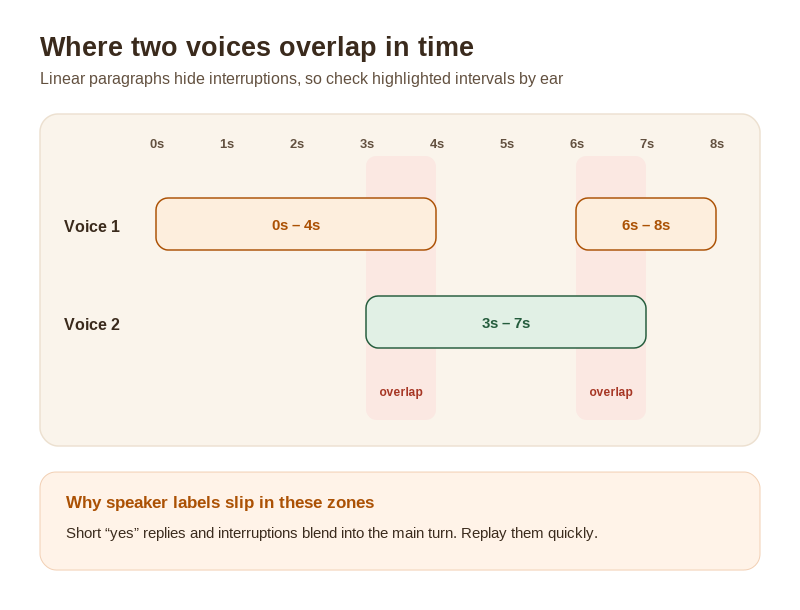
Where speaker labels fail most often
Almost all mix-ups show up in four spots: half-second replies, interruptions, whispered asides and moments when someone turns away from the microphone.
| What you see in the transcript | How to verify quickly |
|---|---|
| One person split across two labels | Replay one line from each group and merge |
| Two people merged into one label | Listen around the voice change and dialogue flow |
| A brief “yes” under the wrong name | Replay the preceding question and immediate reply |
| Scrambled lines during a debate | Listen to the overlap and note uncertainty if needed |
Do not judge accuracy solely from calm opening introductions. Once a long call speeds up and people interrupt each other, check key commitments directly.
Handle overlapping speech honestly
When two people argue at once, neat alternating paragraphs create a false impression of order.
In working notes, a brief interruption marker is enough. For a direct quote, confirm who said what—and if the overlap truly cannot be separated, leave a timestamped uncertainty note rather than guessing.
Separate microphone tracks eliminate most overlap headaches. Just remember that a stereo file does not automatically mean one speaker per channel; check beforehand, and plan your interview recording setup early.
Should you specify the speaker count?
If a tool lets you enter the number of speakers, use it only when you know how many voices actually spoke on the recording.
Silent attendees on a call do not add voices, while a played video clip or announcer intro does. Compare automatic detection against a manual count on one tricky excerpt to see which handles swaps cleaner.
Final check before sharing
Verify words first, then double-check speaker names next to every commitment, deadline, figure and direct quote. One misattributed promise flips responsibility completely even with zero typos.
Example: why a speaker label beats a comma
“I will approve the budget” means one thing when a director commits to it and another when a colleague paraphrases someone else’s plan. A swapped label turns summary into obligation. Always check the preceding question as well as the isolated sentence.
Once verified, swap temporary labels for real names and keep the raw timestamped file separate from your edited summary. Whenever real doubt remains, a neutral label is far more honest than an unverified name.
Sources and further reading
- pyannote Community-1: an example speaker diarization pipeline.
- How to record an interview: room and mic choices that make separation easier.
- Transcription: verifying wording, deadlines and meeting outcomes.