
Follow the real route of your recording
With local recognition, the neural model runs directly on your CPU or GPU. With cloud recognition, your voice or audio file travels to a remote server and text comes back. Because one application can offer both modes, check which engine is actually active in settings.
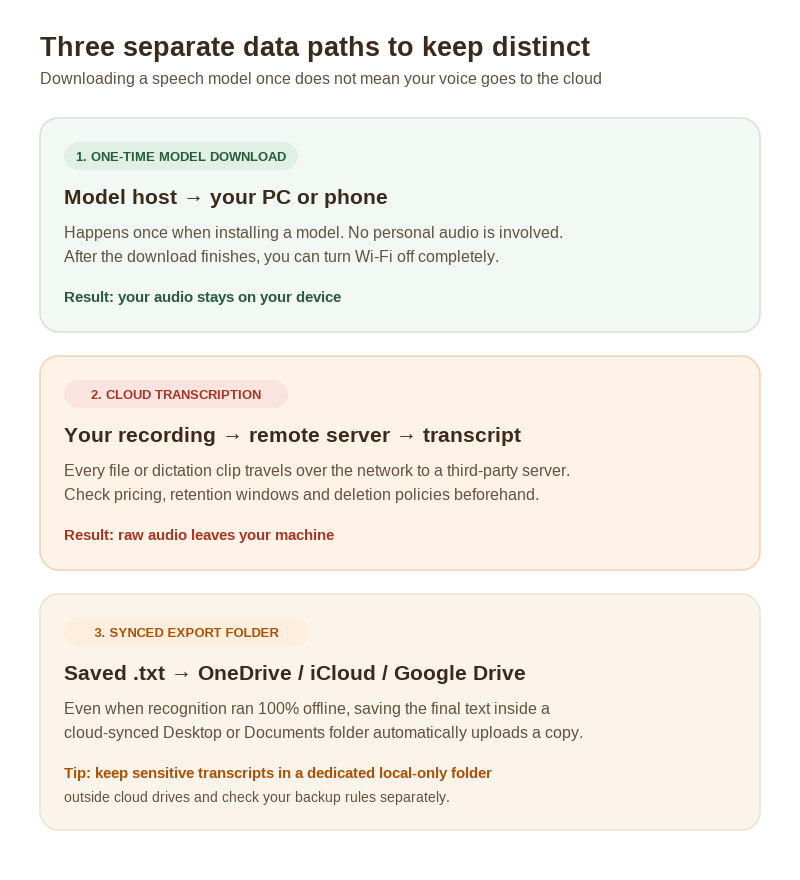
Do not confuse two different network actions: a one-time model download during setup and ongoing audio uploads during use. Downloading weights happens once and never touches your voice.
Microphone or file → model on your device → finished text.
Microphone or file → upload to remote server → finished text.
Compare more than headline accuracy
| Factor | Local on device | Cloud service |
|---|---|---|
| Internet | Not needed after downloading the model | Required for upload and response |
| Compute | Uses your CPU or GPU | Processed on remote servers |
| Cost | No per-minute meter or volume tiers | Usually billed per minute or monthly quota |
| Privacy | Audio stays local; check export folder | Depends on provider retention and deletion terms |
| Speed | Zero upload wait on large video files | Depends on upload bandwidth and server queues |
Neither option wins automatically. A fast cloud server still waits while you upload a 2 GB video over hotel Wi-Fi, while a huge local model on an older laptop takes patience. Always measure total wall-clock time from file to checked text.
Where local recognition clearly wins
Offline processing excels in three scenarios: recordings under NDA or containing personal data, working on flights or shaky connections, and predictable costs without watching a minute meter. Whisper is one widely known open model, joined by fast local options like Parakeet and GigaAM.
Before a trip, download your chosen model and run one full airplane-mode test covering dictation, file import and export.
On a laptop, watch RAM and battery draw: use a compact, snappy model for everyday dictation and switch to a larger model only when transcribing tough hour-long interviews at your desk. Always test your current hardware on a two-minute sample before buying upgrades.
Where a cloud tool is convenient
A browser-based service makes sense when you need a quick one-off transcript on someone else’s machine, or when an older low-power device cannot comfortably process a large backlog.
Before uploading, verify three practical details: file-size caps, duration limits and disconnect behaviour. Some services silently truncate files at 30 minutes, leaving the second half missing.
Five practical privacy questions
For client calls, medical notes or private journals, answer five questions up front:
- Does raw audio leave your device?
- Does the service retain uploaded files and offer full deletion?
- Are customer recordings used for model training?
- Where is local transcript history stored and how do you clear it?
- Is your export folder automatically mirrored to a cloud drive?
HTTPS encrypts audio in transit, yet says nothing about who stores it or for how long after it arrives.
How a local transcript accidentally reaches the cloud
Processing and storage are separate switches. Your model can run 100% offline, yet saving the resulting .txt onto a Desktop folder synced by OneDrive immediately copies it to remote servers.
Model runs on your PC with Wi-Fi off
Transcript saved into your chosen folder
Automatic cloud copy if that folder is synced
For sensitive material, keep a dedicated local folder outside cloud-sync directories and verify your backup rules.
Price your real monthly workload
Add up a normal month: hours of recorded meetings, daily dictation volume and whether you need SRT subtitles. Factor in editing time too—a cheap rate saves nothing if you spend thirty minutes fixing mangled terminology afterwards.
Quick five-step test before committing
- Run one realistic two-minute clip containing your real terminology.
- Check names, figures, dates and negations.
- Verify export in the format you actually use (plain text, timestamps or subtitles).
- Turn off Wi-Fi and confirm offline features genuinely run without a network.
- Check where originals and history live and how to delete them cleanly.
Many people settle on a pragmatic split: local offline dictation every day on Windows and Android plus local file transcription for regular work, reserving cloud tools only for rare non-sensitive exceptions.
Sources and further reading
- Official Whisper repository: open local speech recognition.
- Microsoft voice typing in Windows: an example of cloud dictation.
- Transcription and choosing a Whisper model: practical side-by-side tests on your own audio.